
Akool Video Face Swap for Marketing Videos
See how Akool Video Face Swap helps marketing teams localize and personalize video campaigns. Explore real use cases.
 AuthorYueZhu
Akool Video Face Swap is built for face swap ai video marketing
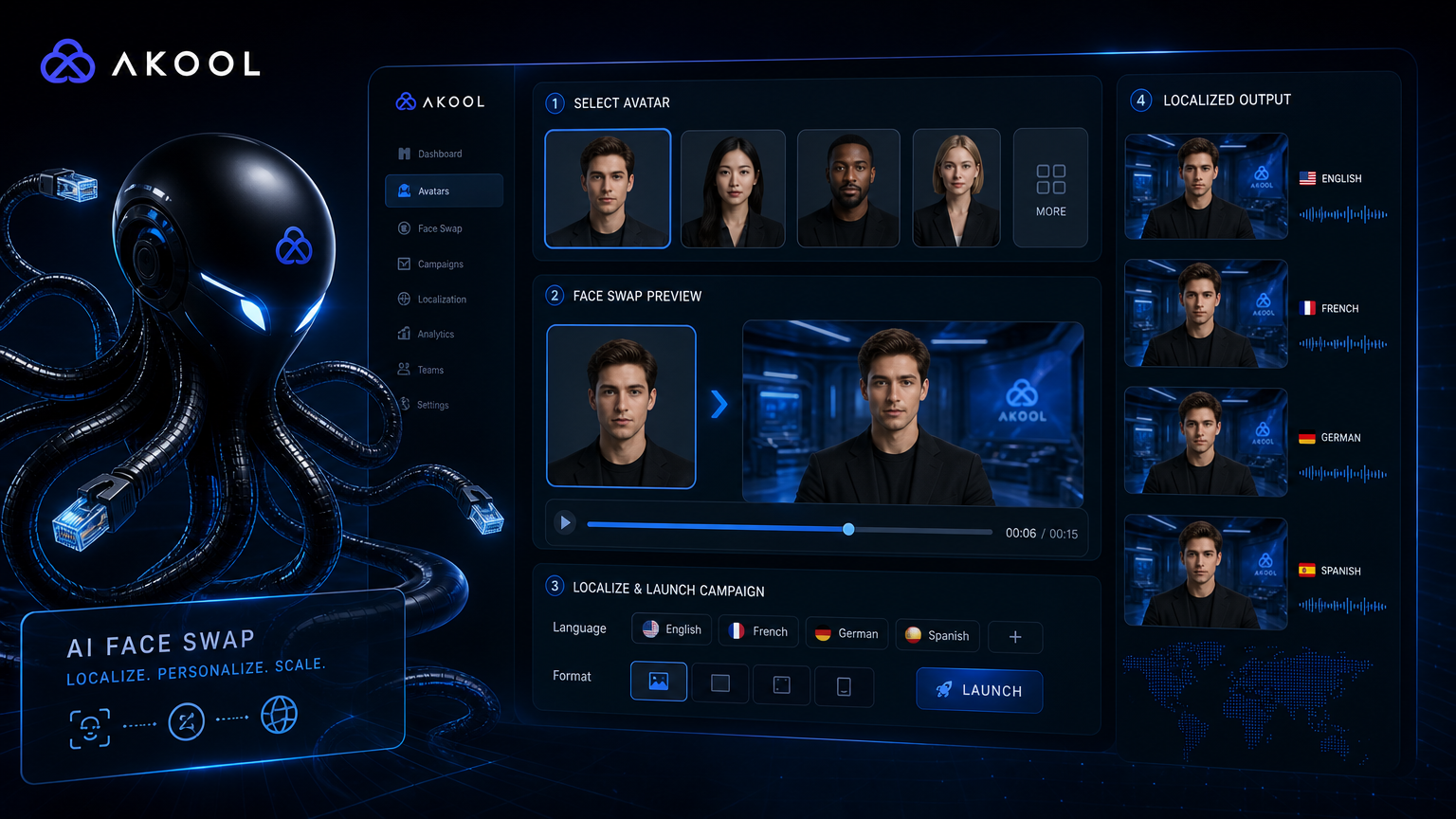
Akool Video Face Swap is part of a broader AI video suite aimed at marketers, agencies, and content teams who need localized, personalized, and avatar-driven video. Instead of treating face swap ai video as a standalone trick, Akool wraps it into a workflow that includes avatar generation, lip sync, and translation. The result is a face swap ai video tool for campaigns rather than a raw API for developers.
This matters because marketing teams usually care more about final visual polish and speed than about model architecture. Akool trades some technical flexibility for ease of use, which can be the right trade-off when the goal is a finished face swap ai video campaign asset rather than a reusable backend service.
What Akool Video Face Swap does for face swap ai video
Akool Video Face Swap replaces faces in video while preserving expression, lighting, and motion. It is typically used alongside other Akool features: talking avatars, video translation, and image generation. The platform is browser-first, so a video face swap online workflow can start with a template, a script, or an uploaded clip. This makes face swap ai video accessible to marketers without engineering support.
The core use case is personalization at scale. A single base video can be adapted for different markets, spokespeople, or audience segments without reshooting. For teams that produce a high volume of short-form ads, social content, or internal communications, this face swap ai video approach removes much of the production overhead.
Akool publishes capability updates and workflow guides on its official platform, where it positions face swap ai video and ai video avatar features as part of a complete marketing-video stack rather than single features.
Face swap ai video and video localization use cases
Akool Video Face Swap fits several concrete marketing workflows:
- Localized campaigns: Replace the spokesperson in a master video with local talent or avatars for different regions. This is the most common video localization use case.
- Personalized outreach: Generate variant ads where the face matches the target audience or a named recipient.
- Brand consistency: Keep the same base footage while swapping in approved brand ambassadors across markets.
- Avatar-driven content: Combine face swap ai video with talking avatars to produce scripts without live actors.
- Social media variants: Create multiple cuts of the same concept with different faces for A/B testing.
- Akool ai workflow: Use the platform's bundled avatar, lip sync, and translation tools end to end.
For a broader comparison of how video face swap tools differ, see the video face swapper taxonomy guide. If your team needs a developer-focused alternative, the WaveSpeed Video Face Swap overview covers API-first options.
Akool vs developer-first face swap ai video tools
| Need | Akool Video Face Swap | Developer-first API |
|---|---|---|
| Marketing templates and UI | Strong | Usually absent |
| Avatar + lip sync + translation | Included | Requires separate tools |
| Batch API automation | Limited | Strong |
| Custom backend integration | Limited | Strong |
| Cost at scale | Higher per-video | Lower with volume |
| Ease of use for non-technical teams | High | Lower |
Akool is not the cheapest way to process thousands of face swap ai video clips. It is also not the most flexible for custom pipelines. Its strength is the packaged video face swap online workflow: upload, select, localize, and publish from one interface. For teams that value speed and visual consistency over granular control, that is a meaningful advantage.
Pros and cons of Akool face swap ai video
Pros
- Integrated avatar, lip sync, and translation tools
- Browser-based workflow with templates
- Fast turnaround for short marketing clips
- Useful for localization and personalization
- No-code friendly for marketing teams
Cons
- Higher cost than raw API face swap services
- Less flexible for custom backend integrations
- Complex motion and occlusion can reduce quality
- Long videos become expensive quickly
- Cross-language lip sync may need manual review
- Not suitable for identity verification or forensic use
When to choose Akool for face swap ai video
Akool Video Face Swap works best when the project is a marketing campaign, brand video, or localized content push. It is especially useful when the team includes marketers, copywriters, or designers who need to produce many variants without asking engineering for help.
It is a weaker fit for product teams building a face swap ai video feature inside their own app, for workflows that need strict cost control at scale, or for productions that require deep customization of the rendering pipeline. In those cases, an akool face swap alternative like WaveSpeed multi-person face swap is usually more appropriate.
Face swap ai video limitations to plan around
Face swap ai video is a creative technology, not a forensic one. Do not use Akool outputs for legal evidence, news reporting, medical imaging, or identity verification. Quality also depends on input quality: fast motion, side profiles, heavy occlusion, and poor lighting all reduce consistency. This applies to any video face swap online service, including akool ai workflows.
Brand and legal review remain necessary. Even when the face swap looks correct, consent, likeness rights, and platform policies must be checked before publication. Marketing teams should treat Akool outputs as draft assets that need approval, not as final broadcast-ready content.
How to access Akool face swap ai video through OpenOctopus
OpenOctopus exposes Akool Video Face Swap through a unified model page. You can test prompts in the playground or call the API from your backend using an OpenAI-compatible client. This gives teams a path from marketing experimentation to production integration without rebuilding their infrastructure.
For teams running multiple video models, the AI API platform guide explains how to unify authentication, routing, and billing across providers.
FAQ
-
What is Akool Video Face Swap best for?
Marketing videos, localized campaigns, personalized ads, and avatar-driven content where visual polish matters more than backend flexibility.
-
Can Akool handle long videos?
It can, but cost and processing time scale with duration. Short marketing clips are the most practical starting point.
-
Does Akool include avatar and lip sync?
Yes. Avatar generation, lip sync, and translation are part of the same platform, which is one of its main differences from raw face swap APIs.
-
Is Akool cheaper than API-only face swap tools?
Generally no. Akool charges for the packaged workflow, which is often more expensive per video than developer APIs at scale.
-
Can developers build products on top of Akool?
Possible through the API, but Akool is optimized for campaign workflows rather than deep backend integration.
-
Are Akool face swap outputs safe to publish?
Only with proper consent, likeness rights, and compliance with platform policies. They should not be used for identity verification or news.
Final verdict
Akool Video Face Swap is a strong choice for marketing teams that need face swap ai video inside a complete campaign workflow. Its integration with avatars, lip sync, and translation makes it more useful for localized content and ai video avatar production than standalone face swap tools.
It is not the right tool for low-cost bulk processing, complex custom pipelines, or developer-centric integrations. For those cases, a dedicated face swap API is usually a better fit. The best choice depends on whether the team values packaged speed or backend control.