
What Is Wavespeed Video Face Swap
See how Wavespeed powers video face swap behind the scenes. Explore now and learn how it actually works.
 AuthorYueZhu
What WaveSpeed brings to video face swap
Wavespeed Video Face Swap is an AI model that replaces faces in video while preserving motion, lighting, and expression. It is aimed at developers and SaaS teams who need a video face swap API they can integrate into apps, editors, and content pipelines rather than a one-off consumer tool.
Wavespeed is exposed as a REST inference endpoint. Through OpenOctopus, developers can access the same capability with an OpenAI-compatible request shape, unified billing, and async task handling. That makes Wavespeed interesting for teams that want video face replacement without building separate provider integrations.
What is Wavespeed Video Face Swap?
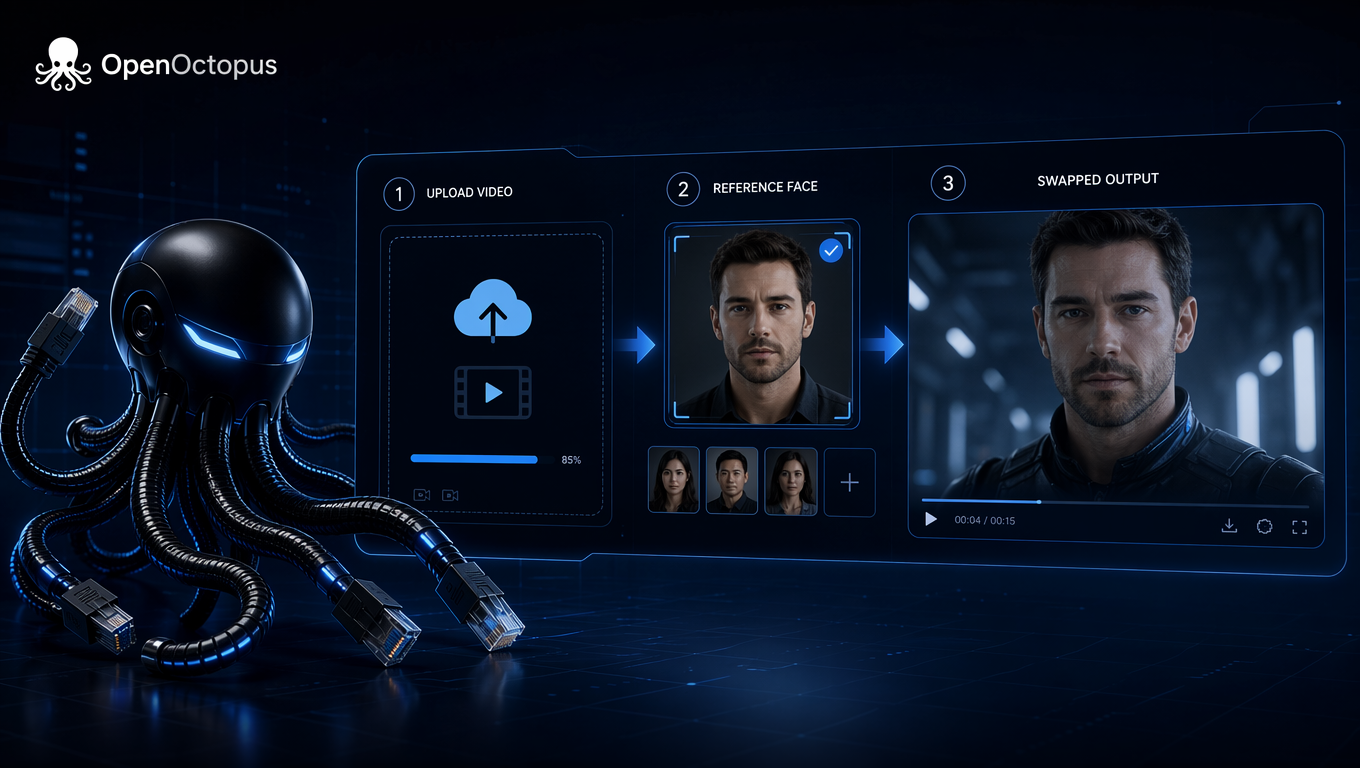
Wavespeed Video Face Swap is a specialized AI video face swap model. You upload a source video and a reference face image, and the model maps the reference identity onto the target faces in the video. The output keeps the original head pose, facial motion, and lighting as much as possible, which is what makes the result watchable rather than a static paste. In other words, it turns a face swap video into a coherent clip instead of a slideshow of edited frames. Recent video face swapping research describes the task as replacing identity in a video while preserving pose, expression, illumination, and background.
The model supports multi-person face swap through a target_index parameter. This matters because many video face swap online tools only handle the most prominent face. Wavespeed lets you pick which face to replace when several people appear in the frame, so a single video face changer can handle group shots and interview scenes.
The model accepts a video file or public URL, a reference face image, and an optional target index. It returns a task ID that you poll until the job completes. The workflow is asynchronous because video rendering takes longer than image generation. This polling pattern is typical for any serious AI video face swap API.
How Wavespeed Video Face Swap works
The pipeline follows a standard video face replacement architecture:
- Face detection locates faces across video frames.
- Face embedding converts the reference image into an identity vector.
- Face tracking follows the same target face through the clip so the swap stays consistent.
- Video rendering blends the new face onto each frame while preserving expression and lighting.
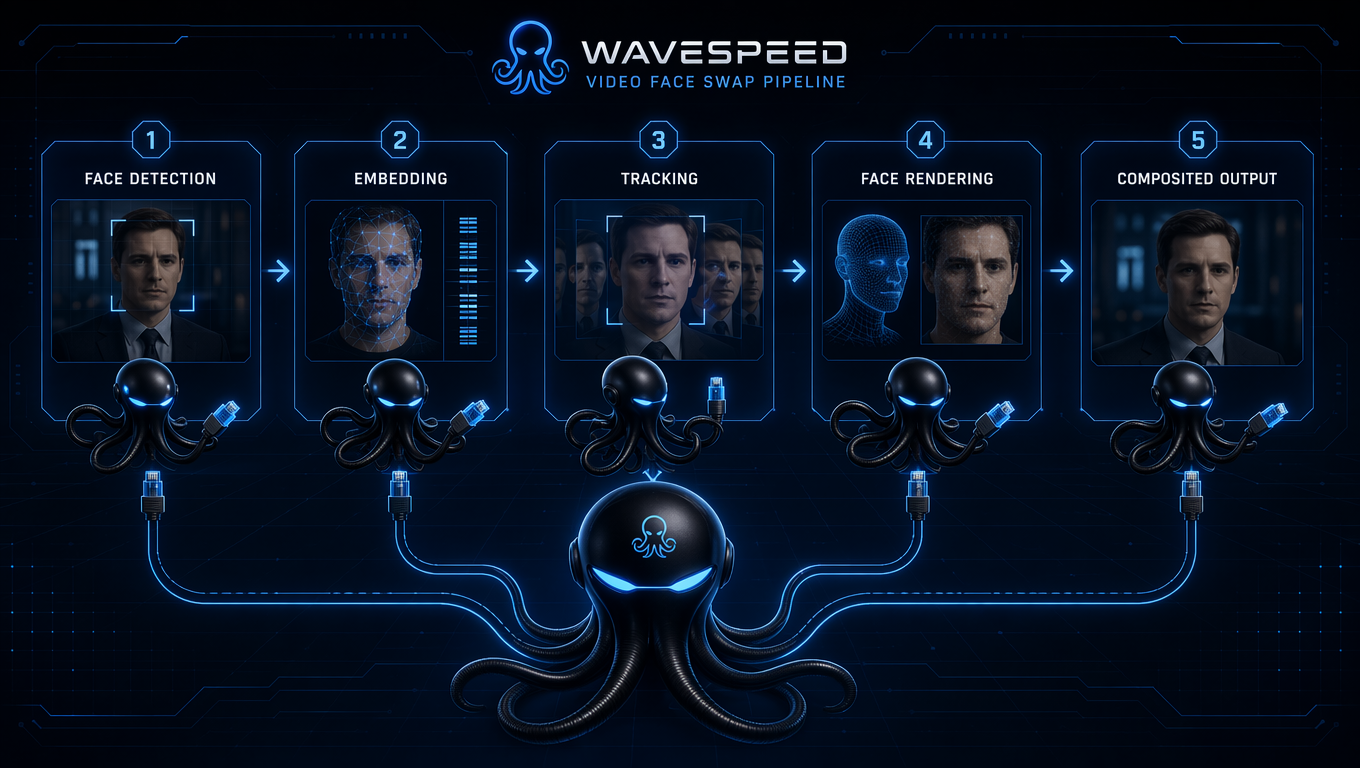
The result is a face swap video that looks natural on short clips. Studies on video face swapping note that diffusion-based approaches can improve temporal consistency over earlier GAN-based methods, though motion and occlusion remain hard cases.
For longer videos, processing time and cost scale with duration, so production workflows should use an async queue rather than synchronous calls. Teams building a video face replacement pipeline should plan for queue workers, object storage, and result caching from the start.
API request structure and example
On OpenOctopus, the model is called openoctopus/video-face-swap. The endpoint follows the /v1/videos/generations contract. You submit the source video, reference face image, and optional target_index, then poll the task status until it reaches succeeded.
curl -X POST https://api.openoctopus.com/v1/videos/generations \
  -H "Content-Type: application/json" \
  -H "Authorization: Bearer ooq_your_api_key" \
  -d '{
    "model": "openoctopus/video-face-swap",
    "prompt": "swap the face in the source video with the reference face",
    "input": {
      "video": "https://example.com/source.mp4",
      "face_image": "https://example.com/face.jpg",
      "target_index": 0
    }
  }'
The response returns a task ID. Poll every 1.8 seconds for up to 180 seconds, stopping when the status is succeeded, failed, or cancelled. On success, read the output URL from output_payload.assets[].
| Field | Required | Description |
|---|---|---|
video | Yes | Source video URL or uploaded file for face replacement. |
face_image | Yes | Reference face image to swap into the source video. |
target_index | No | Which face to replace when multiple faces appear. Default is usually the largest face. |
enable_sync_mode | No | Wait for the result inline instead of polling. Only available through the API. |
enable_base64_output | No | Return the result as a Base64 string instead of a URL. Only available through the API. |
Evaluation framework for video face swap
Because the model is asynchronous and video output is harder to inspect than a single image, production teams should measure more than final visual appeal.
| Dimension | What to measure | Why it matters |
|---|---|---|
| Identity fidelity | Does the swapped face match the reference identity across frames? | Determines whether the output is recognizable as the intended person. |
| Temporal consistency | Is there flicker, jitter, or sudden identity drift between frames? | Poor consistency makes the video look artificial. |
| Expression preservation | Do original expressions, gaze, and lip motion survive the swap? | Critical for dialogue and reaction shots. |
| Occlusion robustness | How does the model handle hands, glasses, hair, or foreground objects? | Real videos contain frequent partial face occlusion. |
| Motion handling | Does quality hold up under head turns, fast movement, or camera shake? | Mobile and action footage are common in production. |
| Cost per minute | What is the fully loaded cost after retries and failures? | Video duration multiplies cost quickly. |
| Latency | How long does end-to-end generation take for representative clips? | Affects user experience and queue sizing. |
No single score captures all of these. The best evaluation uses a holdout set of clips that match your actual production conditions, not only polished demo footage.
Wavespeed vs other video face swap options
| Model / Tool | Best for | Limitation |
|---|---|---|
| Wavespeed Video Face Swap | API-first video face swap, batch processing, multi-person scenes | No avatar, lip sync, or video translation workflow |
| Akool Video Face Swap | Marketing templates, polished UI, brand recognition | Higher cost at scale, less flexible for custom pipelines |
| FaceFusion | Local experimentation, fine-grained control | Self-hosted overhead, not an API-first product |
| Roop | Quick prototypes, community models | Maintenance and quality consistency vary |
| InsightFace | Face analysis, detection, embedding | Not a complete video face swap product by itself |
| SwapFace | Desktop streaming and live use | Less suited for batch video processing |
Wavespeed sits between consumer tools and local frameworks. It is more developer-friendly than Akool for custom integrations and more managed than FaceFusion or Roop. The tradeoff is that it does not include the full marketing suite that Akool offers, and its brand is less established. For developers, the decision often comes down to whether they need a face swap video API or a complete creative platform.
If you are comparing image-only alternatives, the Image Face Swap Guide covers portrait transfer models and their limitations. For higher-end commercial image workflows, Face Swap Pro Review explains what production-grade face swapping looks like.
Real use cases and common failure modes
Wavespeed Video Face Swap works well for AI face swap tools, short video production, marketing personalization, entertainment content, and creator platforms. It is a good fit when you need a video face swap online experience that routes through your own backend. Any product that lets users upload a clip and receive a face swap video can use Wavespeed as the engine.
A concrete Wavespeed use case is a short-form video app that lets users insert a friend's face into a licensed reaction clip. The app uploads the clip, sends the reference face, polls the task, and delivers the result. The same flow scales to marketing personalization, where a single base ad can be localized with different faces for different regions.
| Failure mode | Typical cause | Mitigation |
|---|---|---|
| Face drift during fast motion | Tracking loses the target between frames | Use clips with moderate head motion; add manual review. |
| Flicker around occlusions | Hands, glasses, or hair interrupt the face region | Choose source footage with clear, unobstructed faces. |
| Identity mismatch on extreme angles | Reference face angle differs from video angles | Use a frontal reference and frontal or near-frontal source. |
| High cost on long clips | Per-duration billing accumulates | Split long videos into segments; cache reusable outputs. |
| Wrong face swapped in group scenes | target_index picks a different face than intended | Verify target index against a frame preview before batch runs. |
These failure modes are not unique to Wavespeed. They are common across diffusion and GAN-based video face replacement systems.
Pros and cons of Wavespeed Video Face Swap
Pros
- API-friendly: REST endpoint with prediction polling fits standard backend queues.
- Multi-person support:
target_indexlets you choose which face to replace. - Async processing: Suitable for long videos and batch jobs.
- Competitive pricing: Per-duration billing can be cheaper than flat-rate tools for short clips.
- Simple integration: SDKs are available for Python, Node.js, and cURL.
Cons
- Narrow scope: No avatar generation, lip sync, or video translation.
- Brand awareness: Akool and other platforms are better known in the marketing segment.
- Motion sensitivity: Fast movement, occlusion, and extreme angles can degrade quality.
- Long video cost: Costs accumulate with duration, so heavy use needs budget planning.
- Legal risk: Face swap outputs can raise portrait-right and consent issues.
Ethics, consent, and when to avoid it
Avoid Wavespeed for legal evidence videos, news authenticity workflows, medical imaging, or any content used for identity verification. The model is a creative tool, not a forensic or authentication system. Deepfake detection research also shows that face-swapped videos from real-world footage—with motion, partial faces, and variable lighting—are harder for both automated detectors and human reviewers to identify than controlled benchmark clips.
For any product that uses face swap, implement clear consent and provenance practices:
- Obtain explicit permission from anyone whose face is used as a reference.
- Disclose to viewers when a video has been altered.
- Store reference images securely and delete them when no longer needed.
- Reject uploads that contain non-consensual intimate imagery, minors, or public figures used without authorization.
- Provide a reporting and takedown path for affected individuals.
Teams that also generate video from text may want to combine Wavespeed with a text-to-video model. The Seedance Text to Video Guide covers how to generate source clips before applying face replacement.
How to access Wavespeed through OpenOctopus
OpenOctopus exposes Wavespeed Video Face Swap through a unified model page. You can test prompts in the playground or call the API using the request pattern shown above.
For teams building multi-model products that include Wavespeed alongside text, image, and audio models, the AI API Platform Guide explains how to unify authentication, routing, and billing across providers.
Final verdict
Wavespeed Video Face Swap is a practical choice for developers and SaaS teams that need a video face replacement API without managing their own inference stack. It offers decent identity preservation, multi-person handling, and async processing at a competitive price.
It is not a full creative suite. If you need avatars, lip sync, or translated marketing videos, you will need additional tools. But for focused video face swap use cases, Wavespeed is worth evaluating against Akool and local frameworks like FaceFusion.
About this article: This overview is based on the OpenOctopus API documentation for openoctopus/video-face-swap, the upstream Wavespeed model parameters exposed through OpenOctopus, peer-reviewed research on video face swapping and deepfake detection, and hands-on engineering patterns for async video generation pipelines. Pricing and latency figures change, so verify current rates on the OpenOctopus model page before committing to a production budget.