
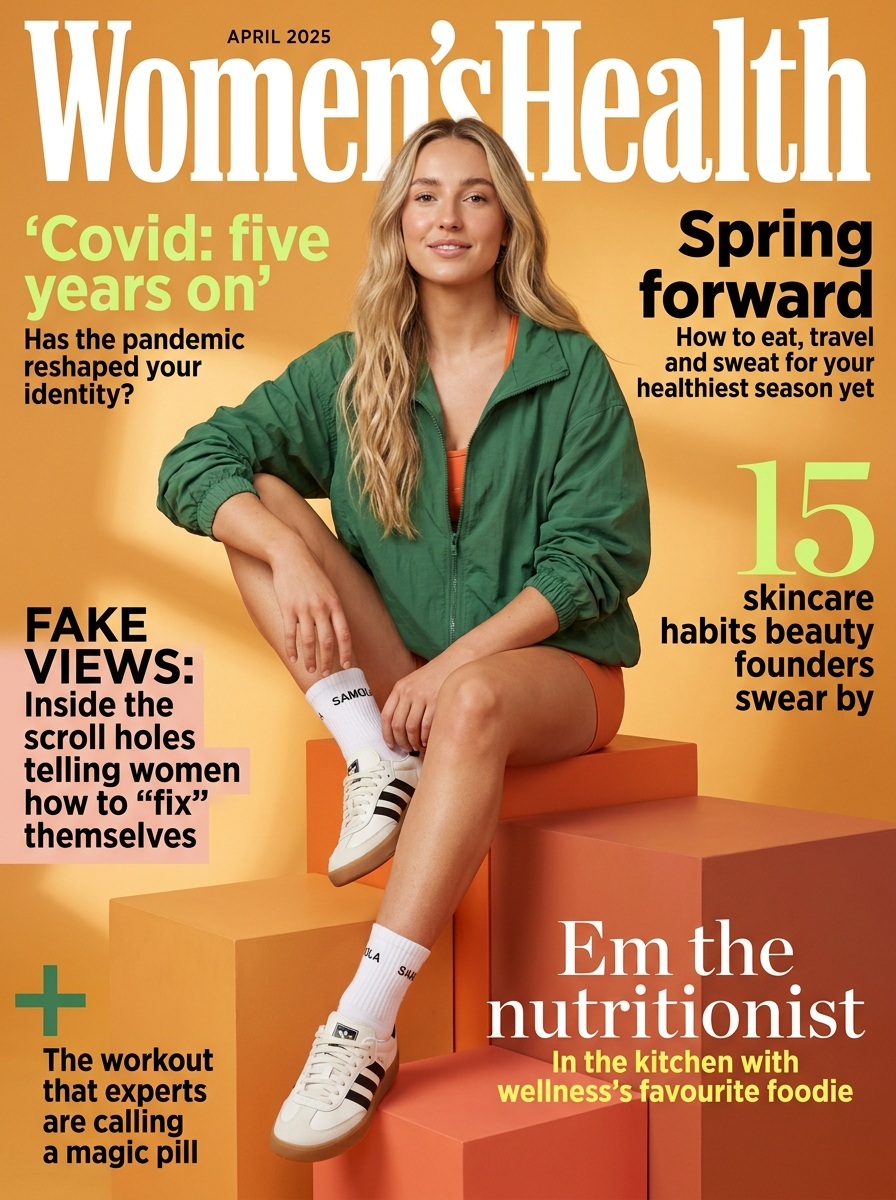
Google Nano Banana Pro Text-to-Image
Google Nano Banana Pro Text-to-Image is a high-quality AI image generation model optimized for advanced prompt understanding, multilingual typography, cinematic visuals, and consistent creative outputs.
Overview
Google Nano Banana Pro Text-to-Image, powered by Gemini 3.0 Pro Image technology, transforms natural-language prompts into visually polished images with strong scene understanding, advanced typography rendering, and enhanced photographic controls.
The model is designed for creators, marketers, designers, and visual storytellers who need reliable image generation with better character consistency, layout control, and multilingual design support.
Why it looks great
- Context-aware image generation: Understands scene structure, objects, and visual relationships for more coherent compositions.
- Multilingual typography support: Generates and edits clear in-image text across multiple languages with improved font rendering.
- Camera-style controls: Supports photographic concepts such as focus, depth of field, angles, and color balance.
- Flexible aspect ratios: Supports portrait, landscape, cinematic, and ultra-wide output formats.
- Consistent character rendering: Maintains subject identity and style consistency across related image generations.
- High-quality visual fidelity: Produces polished, detailed outputs suitable for commercial creative workflows.
Limits and Performance
- Supported resolutions: 1K, 2K, 4K
- Supported aspect ratios: 1:1, 4:3, 16:9, 21:9, 9:16, and additional custom formats
- Output formats: JPEG, PNG
- Prompt support: Natural-language text prompts
- Typography rendering: Multilingual support available
- Camera control concepts: Focus, lighting, angle, and depth-of-field styling
- Best for: Marketing visuals, storytelling, product imagery, and branded creative assets
Pricing
Pricing
depends on the selected output resolution.
| Resolution | Cost per image |
|---|---|
| 1K | $0.14 |
| 2K | $0.14 |
| 4K | $0.24 |
Billing Rule
Each generated image is billed individually based on the selected resolution.
How to Use
- Write a descriptive prompt explaining the image you want to generate.
- Include details about subject, environment, composition, lighting, and visual style.
- Optionally specify camera-style instructions such as depth of field or cinematic framing.
- Choose the preferred aspect ratio and output resolution.
- Submit the generation request.
- Preview and download the generated image.
Input Parameters
| Parameter | Required | Description |
|---|---|---|
| prompt | Yes | Natural-language description of the desired image |
| aspect_ratio | No | Output aspect ratio such as 1:1, 16:9, or 9:16 |
| resolution | No | Output resolution: 1K, 2K, or 4K |
| output_format | No | Image output format such as PNG or JPEG |
Output Format
- High-quality AI-generated image files
- PNG and JPEG export support
- Multilingual typography rendering
- Photorealistic and stylized visual outputs
- Cinematic and marketing-ready image compositions
Pro tips for best quality
- Use detailed prompts with composition, lighting, camera angle, and atmosphere descriptions.
- Include cinematic photography language such as “soft depth of field”, “golden-hour lighting”, or “anamorphic lens”.
- Specify exact in-image text when generating posters or marketing visuals.
- Use consistent character descriptions across prompts for stronger visual continuity.
- Choose 4K output for print-quality assets and premium campaign visuals.
- Use ultra-wide aspect ratios such as
21:9for cinematic scenes and banner layouts.
Note
Please ensure prompts comply with Google safety guidelines. If generation fails or content restrictions are triggered, revise the prompt and try again with adjusted wording.